

- >Buying Crypto
- >How to Buy Crypto with Apple Pay
Why So Many Crypto Exchanges Now Accept Apple Pay

In this guide on how to buy crypto with Apple Pay, we cover all of the steps so you know exactly what to do. We also cover our favorite exchanges that now accept this payment format, so you know the best places to spend your money.

Apple Pay Pros & Cons
Pros
Near instant purchases of crypto using credit or debit cards of choice
Very reliable payment service provider
Allows buying Bitcoin directly using your bank account (if using debit cards)
Won’t have to enter personal details to purchase cryptocurrencies
Cons
There may be additional fees charged by your bank provider
If using a credit card there will be cash advance fees and maybe exchange rate fees
Cannot sell crypto and send back to Apple Pay payment method (such as bank account)
Numerous countries don’t offer Apple Pay
Our Favorite Exchanges That Take Apple Pay
Social trading platform where you can trade crypto alongside stocks and assets.

One of the world’s most trusted and secure crypto exchanges with low fees and advanced trading tools.
A multi-asset platform allowing easy swaps between crypto, fiat, and metals.

A regulated U.S. exchange tailored for simplicity, security, and fiat integration.
Step by Step Guide to Buying Bitcoin with Apple Pay on Coinbase
While the instructions for how to buy crypto with Apple Pay may vary depending on the exchange you’re using, the overall methods are usually similar.
Below you’ll find a step by step guide to buying Bitcoin with Apple Pay using Coinbase Exchange. Other compatible exchanges with Apple Pay include Uphold and Kraken, and eToro lets you add your eToro Money Card to Apple Pay to use crypto for regular purchases.
Double check if your preferred exchange accepts Apple Pay as a payment method before proceeding.
Step 1: Locate the Wallet App on Your iOS Device
Before you can start using Apple Pay for Bitcoin purchases or other digital assets, you’ll need to add a debit, credit, or prepaid card to the Wallet app on your iPhone, Apple Watch, or other iOS device. The Wallet app is automatically installed on all iOS devices.
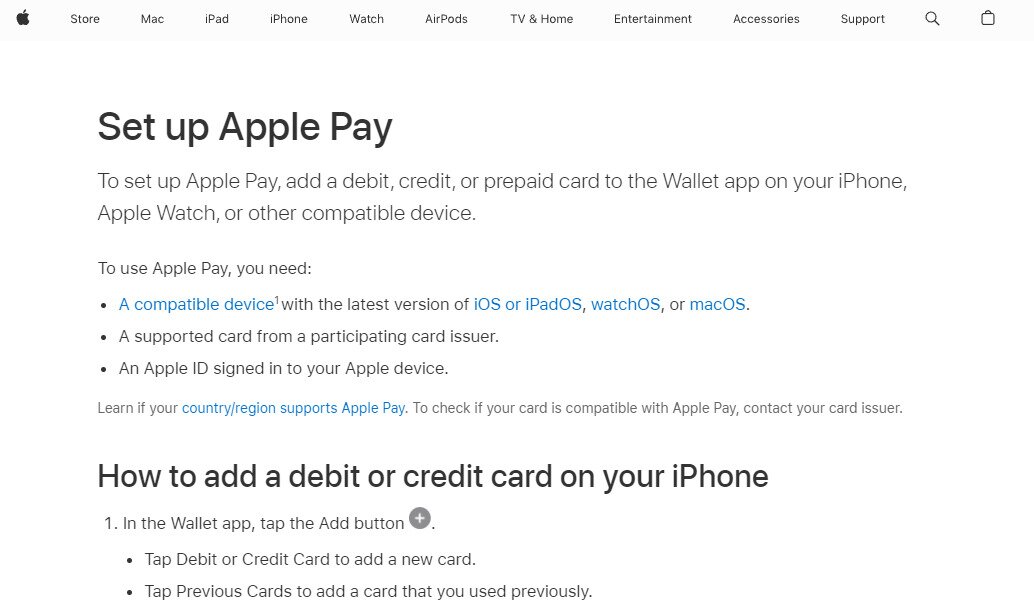
Step 2: Set Up Apple Pay and Add Your Payment Option
Once you’ve located the app, set up the Apple Pay account, which means inputting your billing address and other personal details. Then, you can add payment methods and other cards to the Apple Pay app.
Step 3: Go to a Trading Platform such as Coinbase
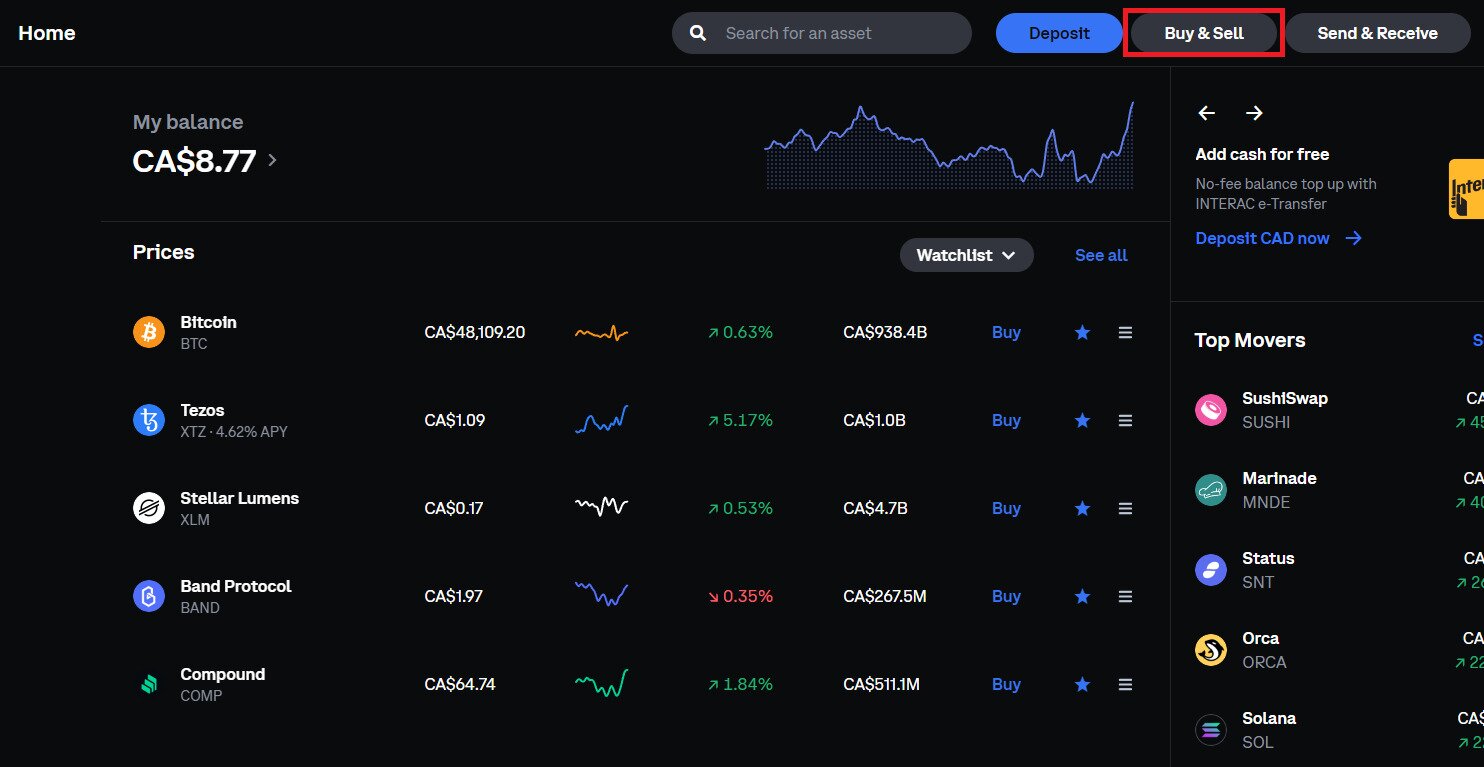
After you’ve set up your Apple Pay account and added a payment card to it, go to your preferred crypto exchange that supports Apple Pay purchases, such as Coinbase. There is no way to buy Bitcoin with Apple Pay directly, so you have to use an exchange.
Once you’re logged into your account, click “Buy & Sell”.
Step 4: Choose Crypto Assets and Amount
You’ll then see the below pop-up. You can select Bitcoin or another cryptocurrency by clicking the “Buy Bitcoin” tab. You can buy crypto as a one-time buy, or as a recurring buy, and use the same payment method for either.
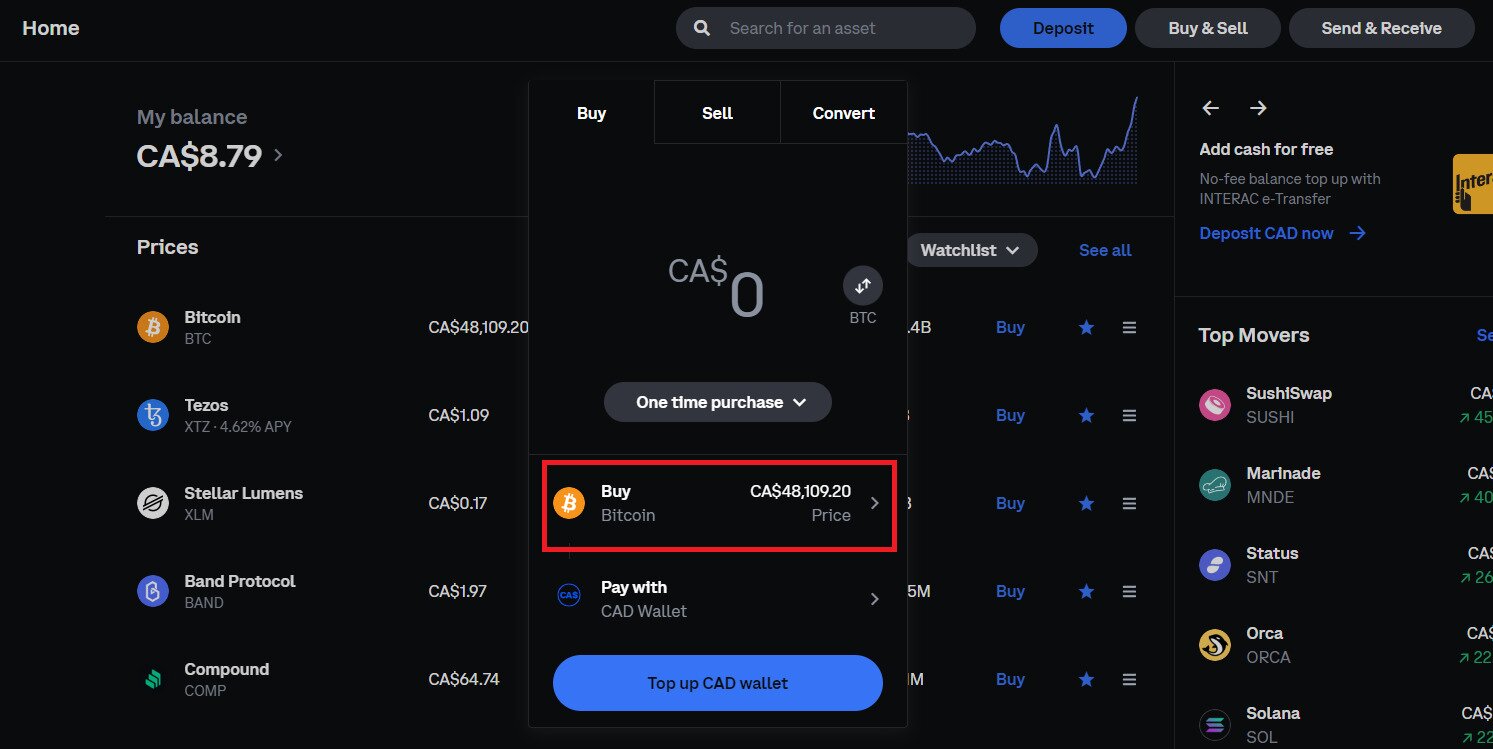
Step 5: Choose Apple Pay as Payment Method
Once you’re satisfied with the crypto purchase, tap the “Pay with” tab and select Apple Pay. Then click “Preview Buy” (where “Top up CAD Wallet is located in image).
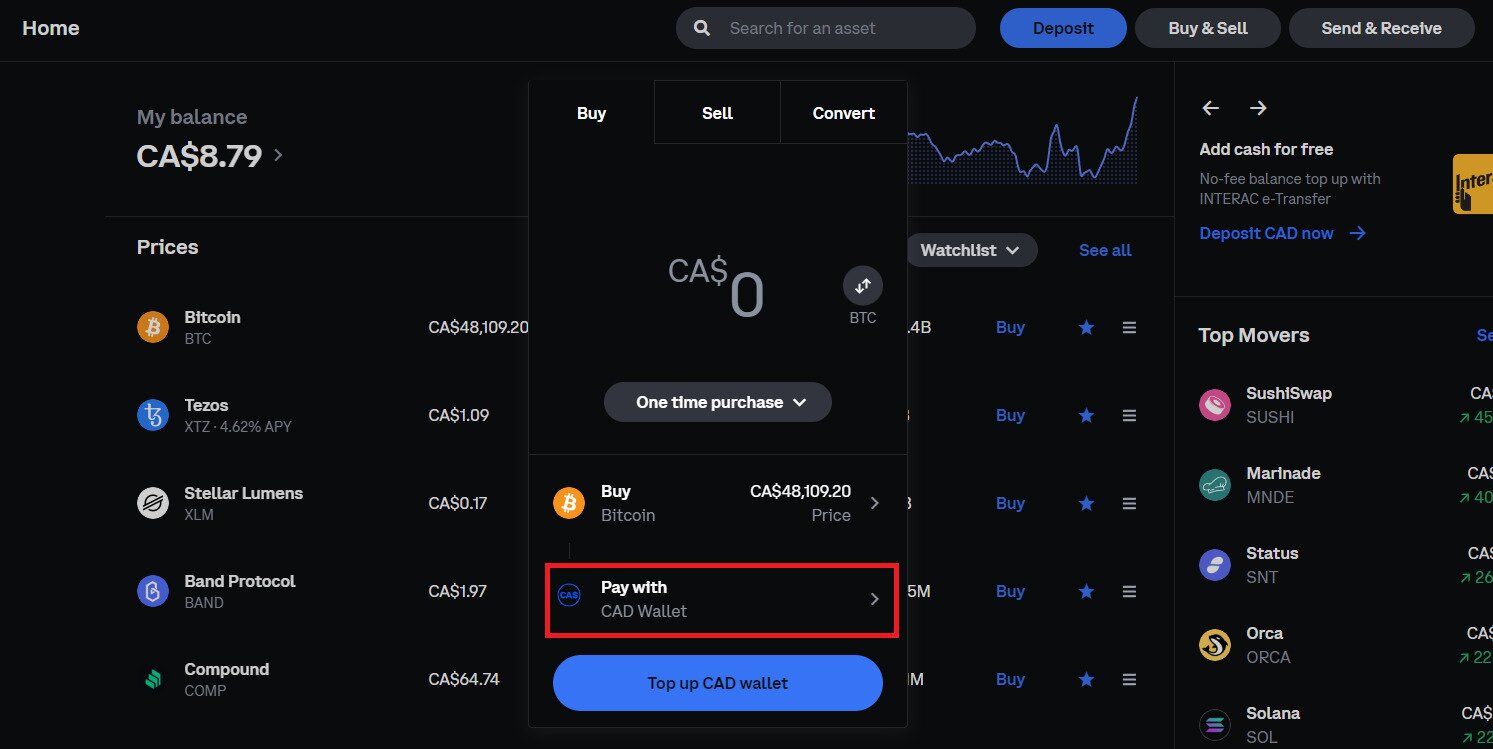
Step 6: Complete Purchase
Once you have clicked “Preview Buy”, you’ll see the image below. You can verify that the payment option you’re using is Apple Pay, otherwise select it. You will also see the cost to buy Bitcoin, including any additional fees charged by Coinbase (your credit or debit card provider may charge more fees). You can choose to buy Bitcoin with Apple Pay once, or on a recurring buy.
Once you’re satisfied, click “Buy now.”
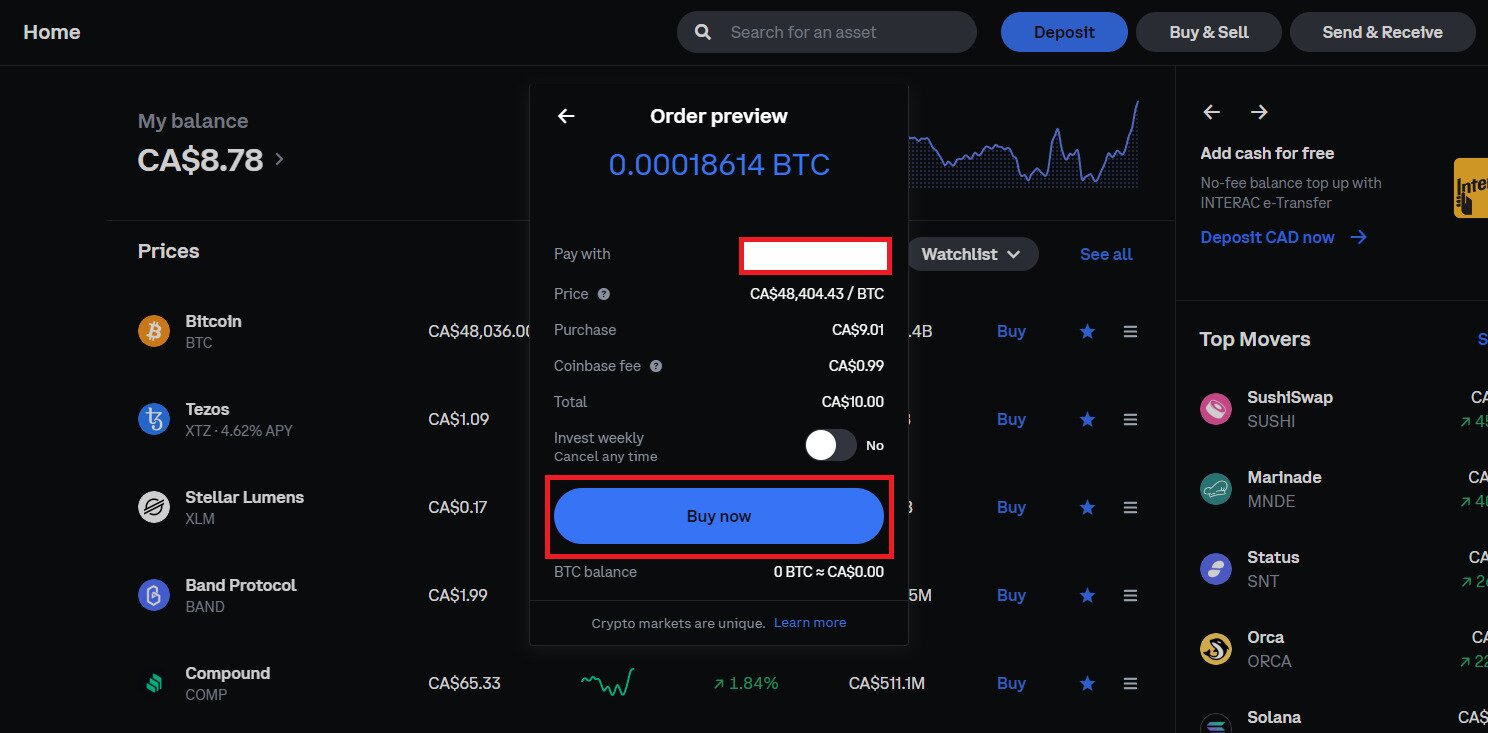
Step 7: Done!
You now know how to buy crypto with Apple Pay. The assets will be deposited directly into your cryptocurrency exchange Bitcoin wallet (or other asset) for you to hold, buy, trade, or sell.
How to Buy Crypto with Apple Pay FAQs
Some of the crypto exchanges that support Apple Pay are:
- Coinbase
- Uphold
- Kraken
- Binance
- Crypto.com
Though you can use Apple Pay to purchase Bitcoin and other crypto assets in the US, not all countries support it for crypto purchases. Check with the trading platform to see if it accepts this payment method in your location.
No, you can only purchase crypto using the Apple Pay option, you cannot sell Bitcoin at this time. Same goes for Google Pay. You have to sell your crypto assets, then cash out the fiat currency to your bank account.
The exchange won’t charge fees for you using Apple Pay, however, your credit or debit card provider might charge additional fees. Apple Pay is just the payment service provider.
You can buy Bitcoin and other digital assets with Apple Pay instantly. The crypto purchases should be deposited to your crypto exchange account wallet address.
No, there is no way to stay anonymous when using your Apple account for purchases.
Generally, you can only use fiat currency with your Apple Pay wallet. However, eToro lets you add their eToro Money Visa debit card to Apple Pay, which let’s you spend your crypto that way since it can be loaded using any asset in your eToro account.
